Creating presentations with AI typically involves four types of capability: content organization, file generation, layout design, and final inspection. Success in any one area alone does not prove the overall task is complete.
This continues the Teacher Preparation Case Study: 7th grade, Silk Road, 40 minutes. Here we produce only two selected slides from the full lesson—one to explain concepts and one to organize a 10-minute discussion.
The "Problem Examples" and "Revision Examples" below are materials constructed for teaching purposes. They are not actual outputs from any specific AI, nor are they model comparisons. The PPT files were actually generated, converted to PDF via LibreOffice, and each page was visually inspected.
Start by Stating Delivery Goals Explicitly
Create two presentation slides for this lesson. The first slide explains "route networks" and "goods and cultural exchange" to 7th grade students. The second slide organizes a 10-minute discussion, with two questions corresponding to M01 and M02 respectively, and speakers should cite their sources.
Student reading content should be brief with clear hierarchy; teacher explanations and supplementary material go in the lesson plan. Deliver an editable PPTX along with rendered pages for review. Do not produce all slides for a full 40-minute lesson.
This requirement also depends on actual capabilities: methods or models for processing content, tools for creating files, ability to design layouts, and ability to open or render the finished product for inspection. If AI needs to inspect visual issues itself, it must also be able to read images and make judgments accordingly.
Four Capabilities: What Evidence to Look For
Teaching plan or page-by-page key points
Subject, focus, and duration meet requirements.Actually openable PPTX
Open to confirm page count, check if editable.Text, images, and hierarchy arrangement
Check actual pages' primary/secondary, density, and reading order.Actual rendered pages and revision records
Check for overlaps, truncation, and content; review again after modifications.| Stage | What Needs to Be Done This Time | What Cannot Alone Serve as Completion Evidence | Actual Evidence in This Example |
|---|---|---|---|
| Content organization | The subject, key knowledge points, and activities meet requirements, based on M01–M03 | An outline that looks comprehensive but exceeds students' current level | Revision focuses on routes and exchange; activities include source references and 10-minute schedule |
| File generation | Obtain an openable, editable PPTX | A statement saying "file generated" or just a filename | Both PPTX files are readable, each containing two pages, and were successfully converted |
| Layout design | Clear hierarchy, readable, no unreasonable text clustering | Inferring layout is normal based only on character count | Revision groups content by knowledge point; activity questions and sources displayed in layers |
| Final inspection | View actual output, correct issues found | Only file size, text extraction results, or model's claim of inspection | Both files have two pages each; all four final rendered images were inspected page by page |
A single application may combine multiple capabilities, and text models can also participate in design and file creation with tool support. Verify actual capabilities rather than making absolute judgments like "text AIs can't design."
Comparison One: Concept Page
Problem Page
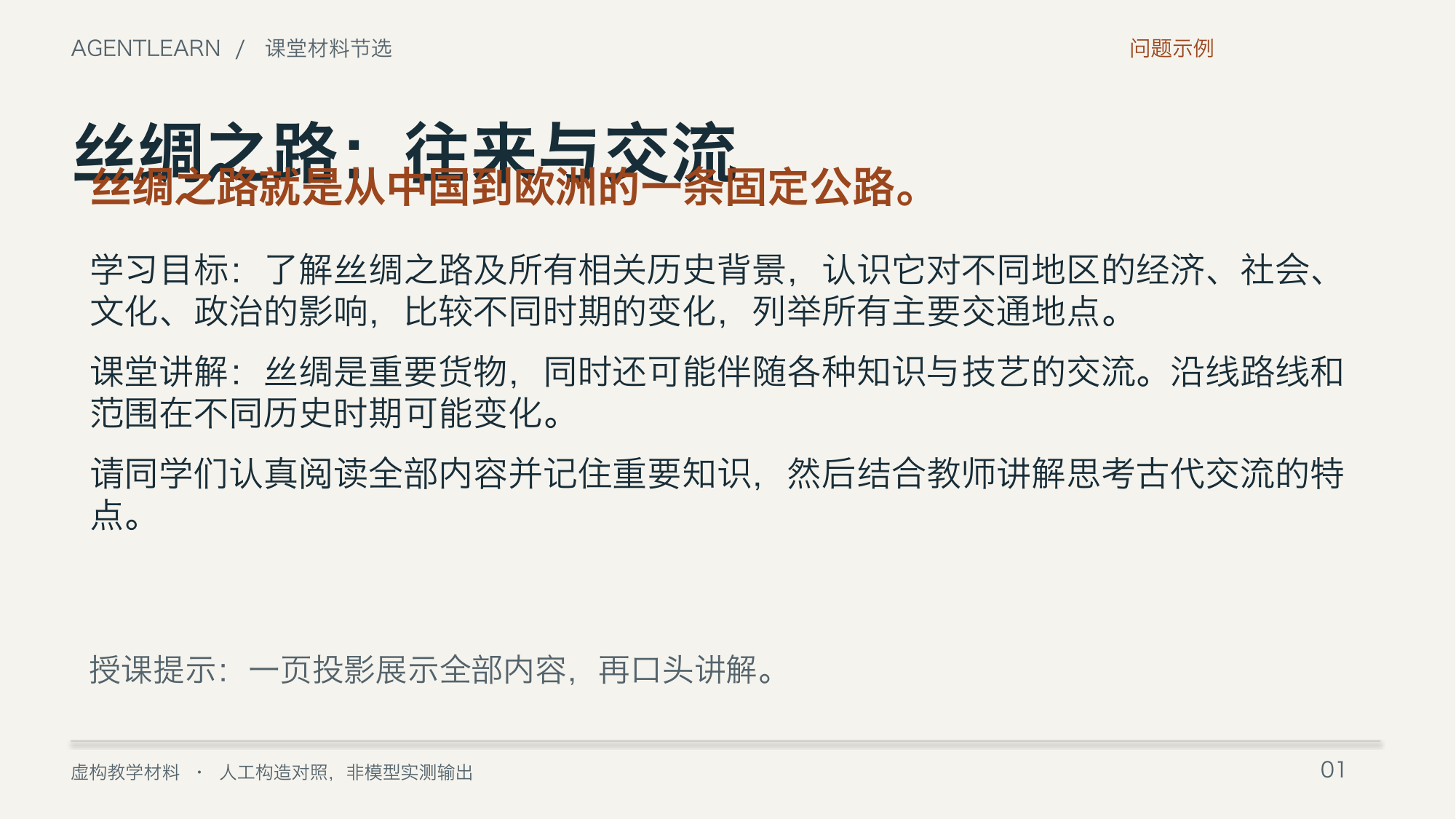
This page has three types of problems simultaneously:
- Describes the Silk Road as "a fixed highway," which contradicts M01's explanation.
- Requires understanding "all relevant historical background," etc., which deviates from the two key points of this lesson.
- Title overlaps with the definition; large blocks of teacher-script-style text crowd the student projection page.
Simply enlarging the font or changing colors cannot fix the first two content problems.
Revision Page
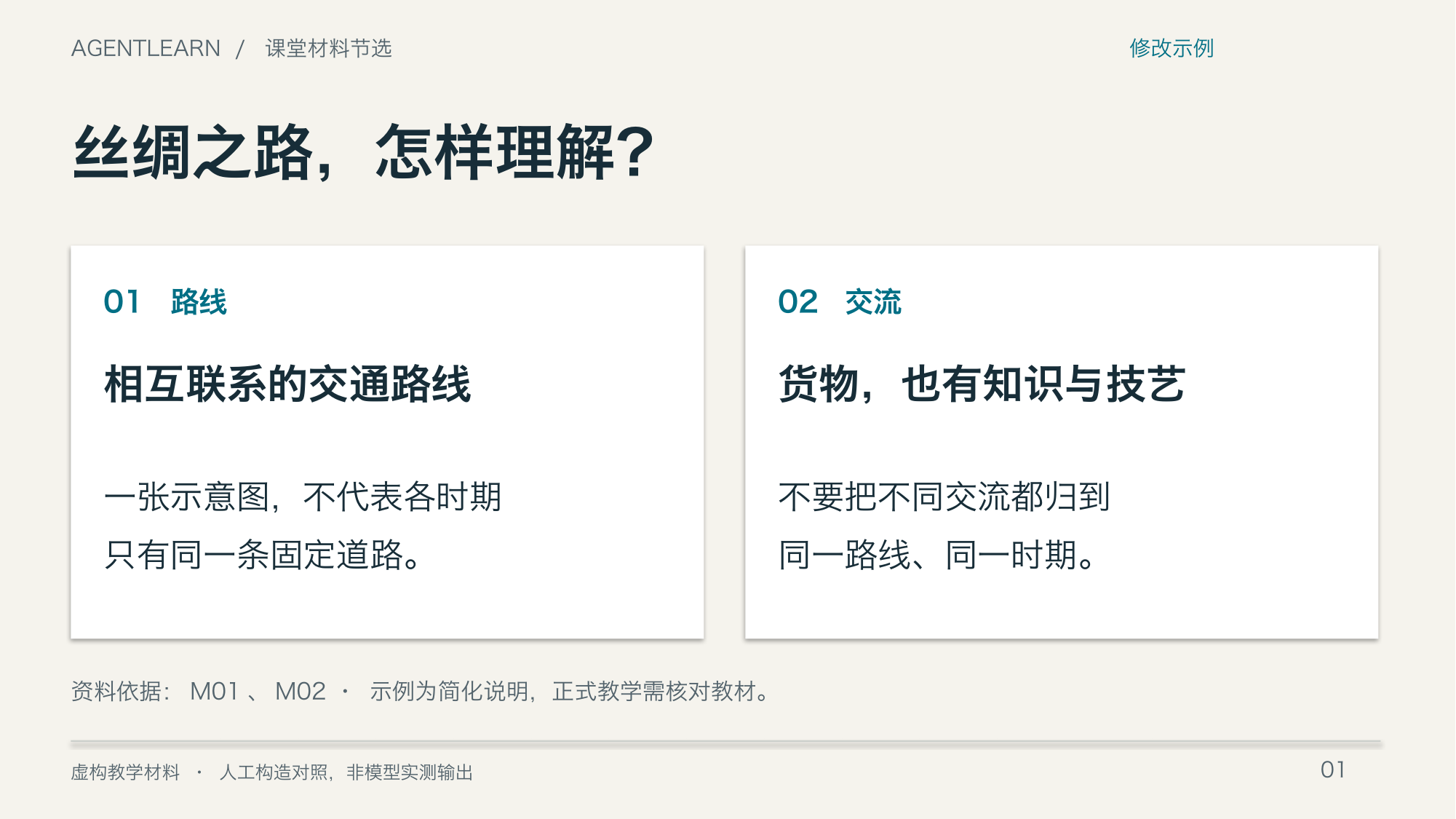
The revision first calibrates content, keeping the two items "routes" and "exchange," then divides them into two areas. Each area has one main point plus one explanation, with M01 and M02 noted at the bottom. Detailed explanations remain in the lesson plan; the page supports comprehension.
This inspection confirms that Chinese character shapes render correctly, no visible overlap or cutoff, and the key knowledge points match the source materials. Whether it's suitable for viewing from the back of an actual classroom still requires real projection testing.
Comparison Two: Activity Page
Problem Page
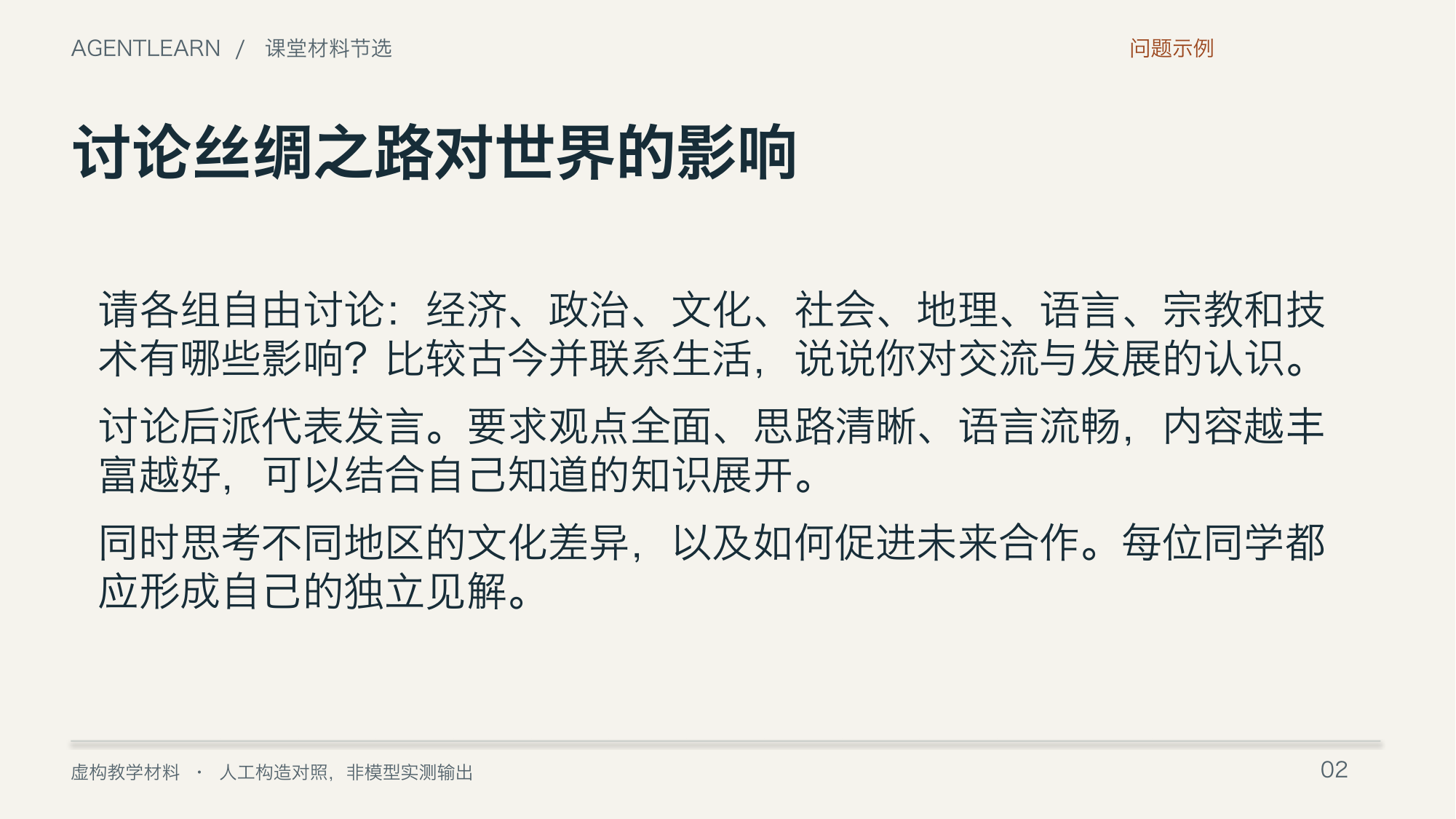
"Broadly discuss world impact" is difficult for 7th grade students to directly connect with their current materials and a 10-minute activity. The page does not specify which materials to read, which two questions to answer, nor does it have a clear time structure.
Revision Page
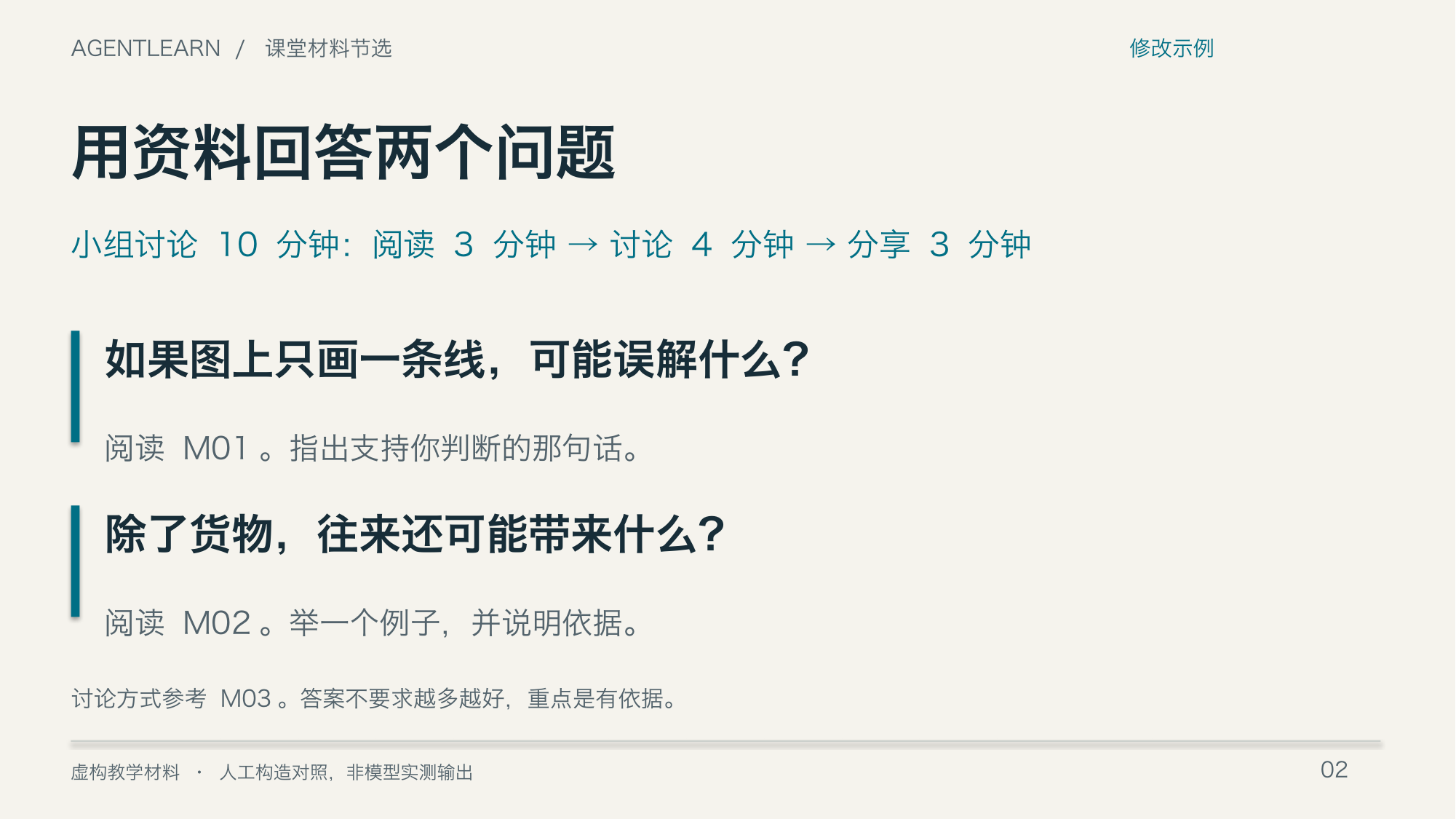
The revision clearly states two questions, source citations, and "3 minutes reading, 4 minutes discussion, 3 minutes sharing." The page tells students what to do next, and teachers can verify whether tasks deviate from goals.
The source descriptions and teaching notes in both example slides are retained in the footer for easy identification. Still verify against actual teaching materials, student situation, and projection environment before classroom use.
What Else This Actual Inspection Revealed
The initial conversion generated a PDF, but Chinese characters displayed as empty boxes. The cause was that the conversion environment failed to properly detect system Chinese fonts. After configuring the font directory and re-rendering, the final font report included HiraginoSansGB-W3 and HiraginoSansGB-W6; all four pages were re-examined.
This demonstrates that successful conversion proves only that one file generation step completed—it cannot replace inspecting actual pages. The technical process is documented in the Verification Record; readers do not need to learn these configurations to understand this example.
Downloadable Example Files
| Version | Editable File | Fixed-Layout Preview |
|---|---|---|
| Problem example, two pages | before.pptx | before.pdf |
| Revision example, two pages | after.pptx | after.pdf |
PPTX files may reflow in different software or font environments; this visual inspection corresponds to the provided PDFs and images. Both PPT files are selections only and do not serve as a complete course delivery.
Reflect
You receive a PPT that opens fine and has no text overflow, but the discussion questions don't match students' current level. What type of inspection is this material still missing?
Reference answer: Still missing verification of content against task goals. A usable file and normal layout cannot prove the content is appropriate for this lesson.
Next Steps and Sources
Return to Prompt: How to State Requirements, or see How Agents Continue Processing Based on Results. For the distinction between model and tool capabilities, refer to OpenAI Using tools. Verification date: 2026-09-09. The four-capability breakdown and layout versus problem-page distinction are this site's instructional design, not an official classification.